
Draw your Claude Code agent team
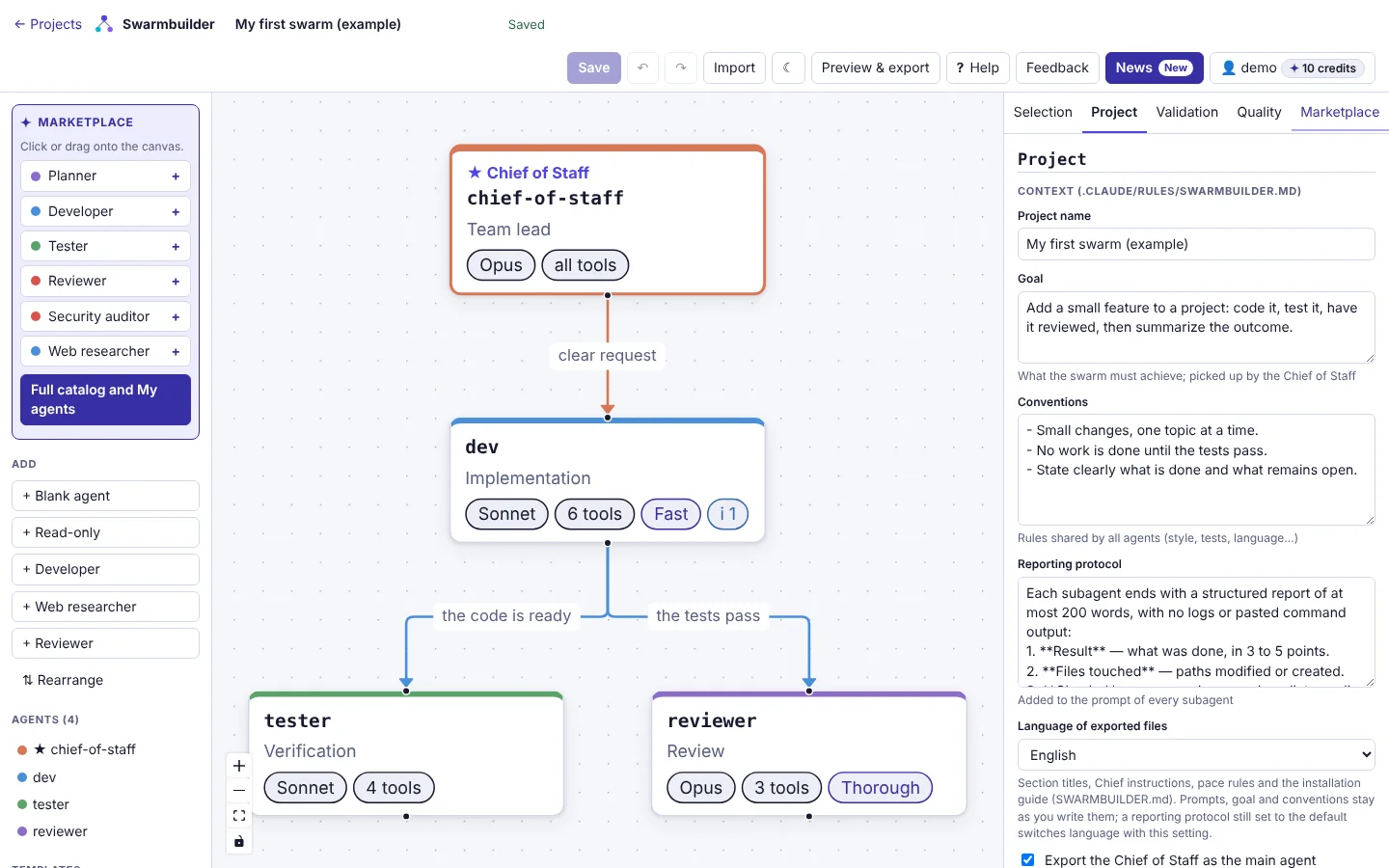
Swarmbuilder is a visual editor and generator for Claude Code agent teams: build the team on a canvas, tune each agent, then export the files to drop into your repository.
- 21
- ready-made agents in the Marketplace
- 3
- export targets: Claude Code, Agent SDK in TypeScript and Python
- 3
- import formats: ZIP, .claude/ folder or swarm.json
- 1:1
- round trip: what you export re-imports identically
Let Claude Code prepare the team in your repository
The Swarmbuilder MCP server plugs into Claude Code, or into claude.ai as a custom connector: Claude talks it through with you, Swarmbuilder validates the team, Claude writes the files.
Your repository stays yours
Swarmbuilder never reads or writes your repository: Claude Code sends it facts and the state of the files, then writes what comes back itself.
No model called
Swarmbuilder validates the draft, computes the write plan and returns the exact contents, without calling any model.
A single credit
Only generating the files costs 1 credit, like a ZIP. Preview, validation, saving the project and reading it back are free.
No key to copy
You connect with OAuth, in the browser, with your account. A personal API key remains available for scripts.
In your terminal, a single command
claude mcp add --transport http --scope user swarmbuilder <service-address>/mcpThen, in Claude Code, run /mcp, pick swarmbuilder and “Authenticate”. In claude.ai, add the server address as a custom connector.
Available once the service administrator has opened MCP access.
How it works
Three steps, from idea to files in your repository.
Draw your team on the canvas
Place a Chief of Staff and its agents, connect them, or start from a team template.
Tune each agent
Model, system prompt, tools and work pace: everything is set in the inspector.
Export and drop it into your repository
Download the ZIP, unzip it at the root of your project, then start Claude Code.
What you can do
Everything you need to design, check and reuse a team of agents.
A canvas, not YAML
A React Flow canvas: place your agents, connect them, move them around. Undo and redo are available everywhere.
Claude Code or Agent SDK export
The .claude/ folder for Claude Code, or an Agent SDK project in TypeScript or Python, in a ZIP.
A Marketplace of 21 agents
Twenty-one ready-made agents (developer, tester, reviewer, security auditor…) to adapt, plus “My agents” to keep your own.
Pace and team profiles
Fast, balanced or thorough for each agent; and a team profile (Balanced, Economy or Rigorous) that sets model, effort, pace and max turns for the catalog agents in one go.
Quality checks
Graph validation (loops, orphan agents, missing tools), prompt linting and token estimation.
Import an existing setup
Bring in a ZIP, a .claude/ folder or a swarm.json: a report is shown before anything is applied, and you can undo.
A lossless round trip
What you export re-imports exactly: edit the files by hand, then come back to the editor.
Guided tour
An annotated sample project and a short tour to get to grips with the editor.
Differences before you act
Changes between two versions are shown before an import, before saving and at export: modified agents field by field, prompts line by line.
Real team usage
Optionally, an exported hook records subagent calls in a local log; the “Usage” sub-tab of the Check tab reads it in your browser to spot agents never called or too slow.
Files in French or English
Choose the language of the exported files (headings, Chief instructions, user guide), independently of the interface language.
Frequently asked questions
Straight answers to the questions that come up most.
Is Swarmbuilder affiliated with Anthropic?
No. It is an independent tool, neither published nor endorsed by Anthropic. It produces files for Claude Code and the Agent SDK, which are Anthropic products.
What happens to my data?
Your team configurations are stored on the service’s server, tied to your account. Purposes, retention periods and your rights are detailed in the legal notice.
How do credits work?
Importing and exporting a setup uses credits. Some are given for free every month, others can be bought.
Which files are generated?
For Claude Code: .claude/agents/<agent>.md, .claude/rules/swarmbuilder.md, .claude/settings.json (and .mcp.json if the team declares MCP servers), with an installation guide, SWARMBUILDER.md. For the Agent SDK (advanced option): sdk/swarm.ts or sdk/swarm.py with their dependency file.
Can I create the team from Claude Code or claude.ai?
Yes, if the service administrator has opened MCP access: Claude Code then prepares the team right inside your repository, and claude.ai can connect to it as a custom connector (build and preview, with no repository). You connect without a key, with OAuth (claude mcp add, then /mcp and “Authenticate”), or with a personal API key created in My account. Swarmbuilder never reads or writes your repository and calls no model; each file generation costs 1 credit, like a ZIP, everything else is free.
Can I re-import an exported team?
Yes. The import reads a ZIP, a .claude/ folder or a swarm.json, shows you a report before applying anything, then replaces the team or adds its agents. You can undo.
Ready to draw your team?
Build it on the canvas, tune each agent, then drop the files into your repository.